Run more coding agents.
Lose track of none.

Kelpi is a Mac terminal for running Claude Code and Codex side by side. Every agent gets a named pane that shows whether it is working or waiting on you, and its shell keeps running when you close the window or update the app.

Download for macOS
  • Free and open source
  • Apple silicon
  • Signed and notarized

Latest release on GitHub

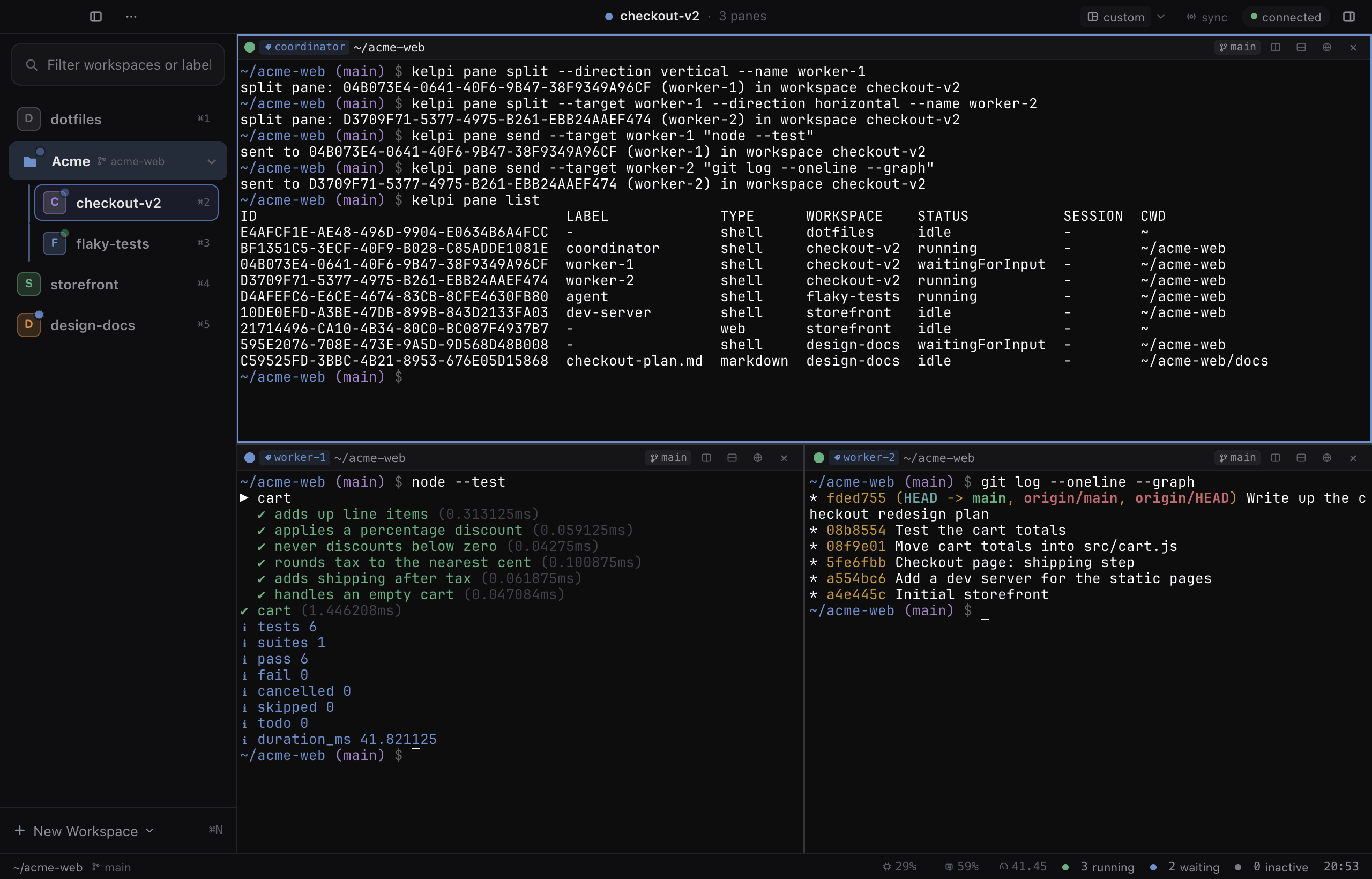
A Kelpi window. A coordinator pane has split off two worker panes and sent each a command, and its pane list shows every pane with its status: running, waiting for input or idle. The sidebar lists workspaces with status dots, and the status bar counts three running and two waiting.

Why it exists

Five agents in five tabs is where it falls apart

Coding agents work best in parallel. A row of terminal tabs was never built to supervise them.

In a row of terminal tabs

  • An agent finished ten minutes ago and is still waiting for a yes in a tab you cannot see.
  • Two agents edit the same checkout and trip over each other's changes.
  • An app update or a closed window ends every session inside it.

In Kelpi

  • Every pane shows running, waiting or idle, and a waiting agent sends you a notification.
  • Each task gets its own workspace on its own git worktree.
  • A daemon holds every shell, so closing, restarting and updating leave agents running.

Features

Built for supervising agents, not just running them

Five things Kelpi does that a plain terminal does not.

See which agent needs you

Hooks from Claude Code and Codex give every pane a live status: running, waiting for input or idle. The pane header, its sidebar row and the status bar all show it, and a notification arrives when an agent stops to ask you something.

  • One command, kelpi install-hooks, wires up both agents and keeps your own hooks.
  • Mute a workspace to keep its agents quiet while you focus elsewhere.
coordinator ~/acme-web

$ kelpi pane list

Panes and the status of the agent in each
LABELWORKSPACESTATUS
coordinatorcheckout-v2running
worker-1checkout-v2waitingForInput
worker-2checkout-v2running
agentflaky-testsrunning
dev-serverstorefrontidle
3 running 1 waiting

Agents outlive the window

A background daemon owns every shell, not the window. Close Kelpi, restart it or install an update, and each terminal passes to the next daemon with the same process and the same screen. Nothing gets typed into a live agent along the way.

  • Only kelpid stop ends your shells, and it asks first.
  • Updates show their release notes and wait for you before restarting.
  1. Close the window running

    Agents keep working. Reopen Kelpi and every pane is where you left it.

  2. Install an update running

    The new version adopts every running terminal as it starts.

  3. Restart your Mac resumed

    Workspaces, layouts and panes come back, and each tracked Claude Code or Codex session resumes.

A worktree for every task

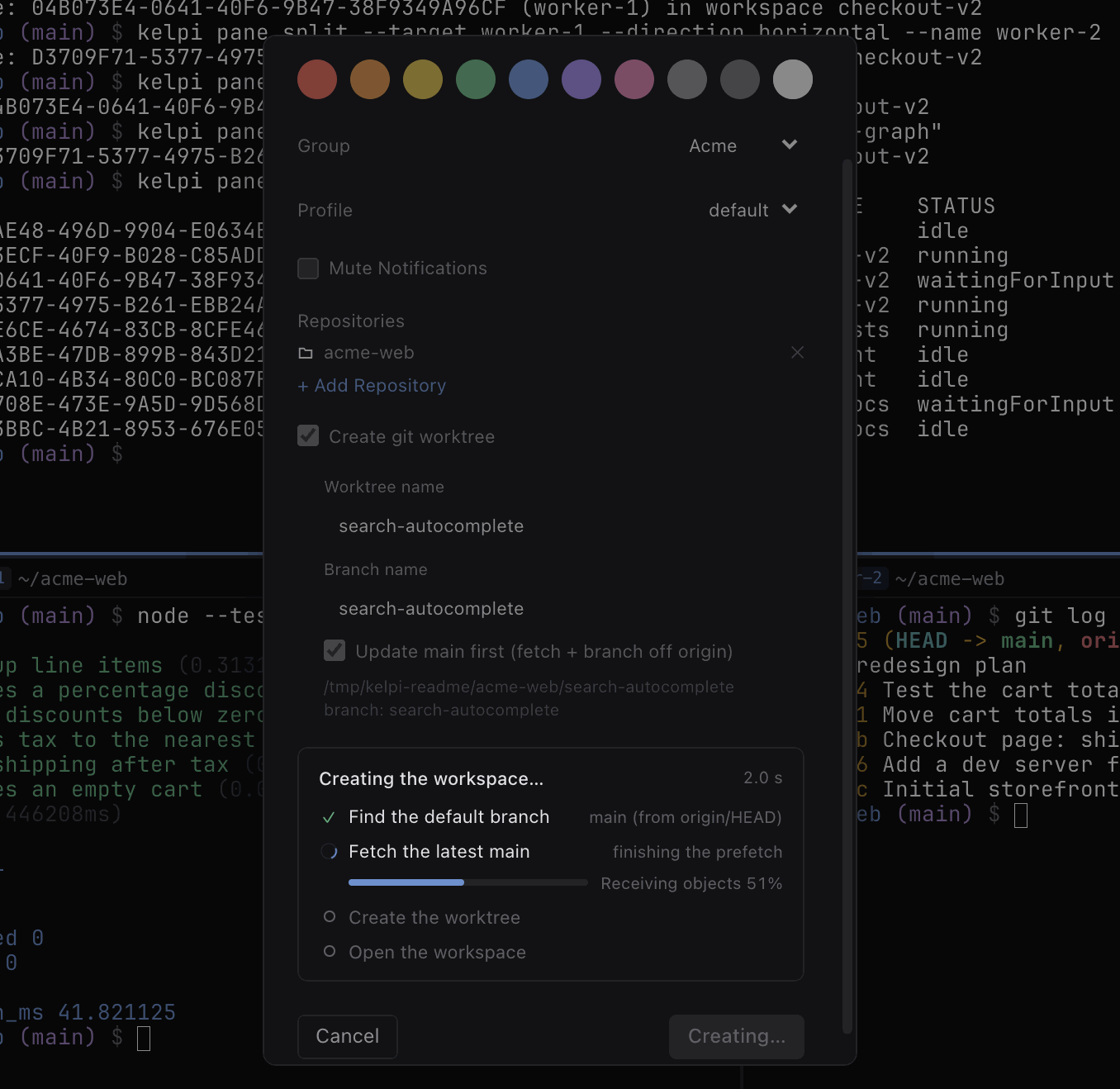
New Workspace cuts a git worktree off the latest origin/main and shows each step as it runs, so agents working in parallel never share a checkout. Cancel leaves nothing behind.

  • Give a group a default repository and every new workspace in it starts there.
  • Each workspace row shows its pull request status from GitHub.
The New Workspace sheet creating search-autocomplete in the Acme group on a new git worktree. Its progress list shows the default branch found, the latest main being fetched, and the worktree and workspace still to come.

Let agents run the fleet

The kelpi command lets a coordinator agent split off workers, hand them tasks and read their output, all without moving your cursor. Kelpi ships a Claude Code skill that teaches the whole pattern.

  • Panes made from the command line open in the background unless you ask for focus.
  • The same commands work from scripts, hooks and any shell inside a pane.
coordinator ~/acme-web
# split off a worker and hand it a task
$ kelpi pane split --name worker-1
$ kelpi pane send --target worker-1 'claude "Fix the flaky cart test"'

# read its screen, then check the whole fleet
$ kelpi pane capture --target worker-1 --lines 40
$ kelpi pane list

A real browser beside the code

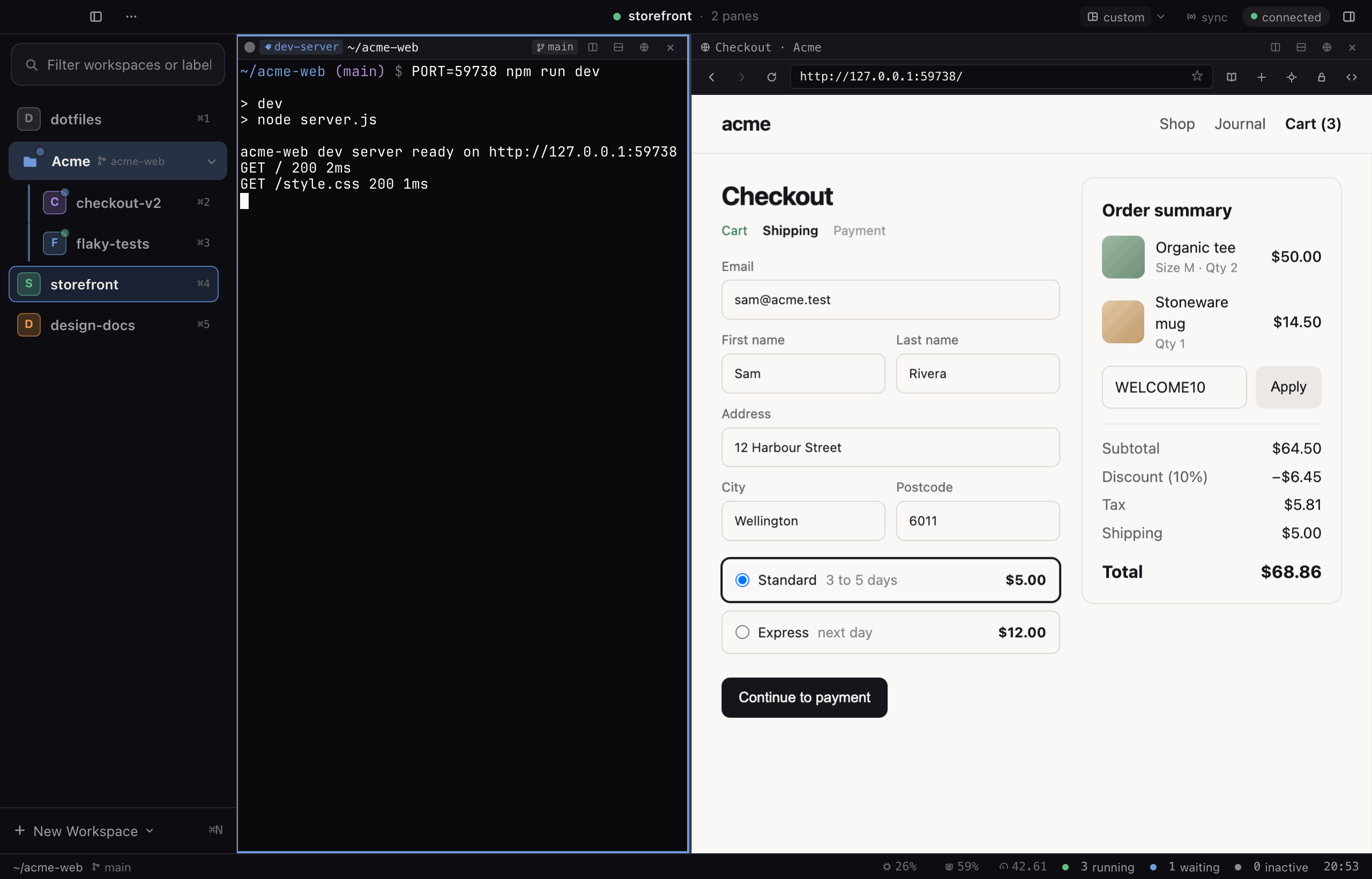
A web pane puts a Chromium page next to your dev server. Click around it yourself, and let agents read it, click it, watch its console and take screenshots.

  • Pick any element on the page and paste its details straight into an agent's pane.
The storefront workspace: a terminal running the dev server on the left, and a web pane on the right showing the checkout page it serves.

Also in the box

  • Markdown, diff and scratchpad panes

    Preview the plan an agent is writing next to the terminal that is writing it.

  • A CSV editor for big files

    Large files open without waiting, and saving keeps every untouched row byte for byte.

  • Your agents on your phone

    Open your workspaces from a phone on your tailnet and answer the agents waiting on you.

  • Plugins with no build step

    Add panes, or replace the sidebars and bars, with plain HTML and JavaScript.

  • Themes that match your terminal

    Eight presets recolour the whole window in one click, paired with ten terminal palettes.

  • Keybindings, applied live

    Rebind any shortcut, with conflicts caught before you save.

Close the window. Install the update. Your agents keep working.

How it works

From download to a fleet in three steps

Kelpi runs beside the terminal you use today, so trying it changes nothing else on your Mac.

  1. 01

    Install Kelpi

    Open the DMG, drag Kelpi into Applications and start it from there. Then choose Install CLI from its menu bar icon.

  2. 02

    Connect your agents

    One command merges Kelpi's hooks into your Claude Code and Codex settings. It backs up each file first and keeps your own hooks.

    kelpi install-hooks

  3. 03

    Give each task a workspace

    Press ⌘N for a new workspace, with its own git worktree if you want one. Start an agent in its pane and split off more as the work grows.

    kelpi pane split --name worker-1

Built to stay running

Safe to leave running all week

Kelpi is developed inside Kelpi, by agents working in its own worktrees, so the parts you depend on get used the hardest.

  • Signed and notarized

    Every release is code signed and notarized through Apple, and published on GitHub with its notes.

  • Updates ask first

    Automatic checks stay off until you turn them on, and Kelpi asks before it restarts.

  • Local by default

    The daemon listens on loopback only and every client needs its token. Remote access runs over your own tailnet.

  • Open source

    Every line is on GitHub under the MIT License, so you can read it, audit it or fork it.

FAQ

Questions before you install

Something else on your mind? Ask on GitHub

Which agents does Kelpi work with?

Anything that runs in a terminal runs in a Kelpi pane, because every pane is your own login shell. Live status, notifications and session resume come from hooks for Claude Code and Codex CLI. Codex needs version 0.142 or later and asks you to trust the hooks once with /hooks.

What happens to my agents when I close or update Kelpi?

They keep running. A background daemon owns your shells and a separate terminal host holds each process, so a restart or an update hands every terminal to the new daemon with the same screen. Only kelpid stop ends them, and it asks first.

What about when my Mac restarts?

The processes end with the Mac, but Kelpi brings back your workspaces, layouts and panes, and every pane with a tracked Claude Code or Codex session resumes that session.

Is Kelpi free?

Yes. Kelpi is free and open source under the MIT License. Download it from GitHub Releases and run it. There is no account and no sign in.

Which Macs does it run on?

Releases are built for Macs with Apple silicon. There is no Intel, Linux or Windows release today.

How is it different from tmux?

Like tmux, a server process owns your shells, so they outlive the window. Kelpi adds what supervising agents needs: a status on every pane, notifications, a git worktree per workspace, browser and markdown panes beside the terminal, and a command line tool that lets agents run other agents.

Can I check on agents from my phone?

Yes, over Tailscale. Kelpi serves its own web client, so a phone or another computer on your tailnet can open your workspaces. On a phone it lists every agent waiting on you and offers one tap replies to clear prompts.

Do I have to use the command line?

No. Everything works from the window, its menus and its shortcuts. The kelpi command is there for scripts, hooks and agents that drive other agents.

Can I change how it looks and works?

Yes. Pick one of eight theme presets and ten terminal palettes, rebind any shortcut, or write a plugin in plain HTML and JavaScript to add panes or replace the sidebars, toolbar and status bar.

Where is my data kept?

On your Mac. Workspaces and layouts live in a SQLite database under Application Support, and settings in ~/.config/kelpi/config. The daemon listens on loopback only, and every client needs its token. Kelpi has no analytics and no crash reporting.

Give every agent a pane of its own

Free to download, with no account to create. Run it beside the terminal you use today and keep whichever earns its place.

Download for macOS
  • Free and open source
  • Apple silicon
  • Signed and notarized

Latest release on GitHub